How do I make a photo collage with music?
Add your photos, open Music and select Add music, then export as video. Photos stay on screen with a slow zoom while the song plays; set the length in the Timing tab or match it to the music.
Free · photos and videos together · nothing uploaded
Add your own track to a collage of photos and clips, choose where the song starts, fade it, and decide what happens to the clips’ own sound.
To make a collage with music, add your photos and videos, then open the Music tab and select Add music to pick a song file from your device. Drag the highlighted window across the waveform to choose the part that plays, set the fades, and export: the song is mixed into the MP4.
collage.video doesn’t include a music library, so you’ll need a track you made or are allowed to use. Phones usually have plenty: voice memos, songs you’ve bought as files, music from royalty-free libraries you subscribe to.
Select Add photos and videos and arrange them in a template from the Layout tab.
Open Music and select Add music. MP3, M4A, WAV, OGG and FLAC all work.
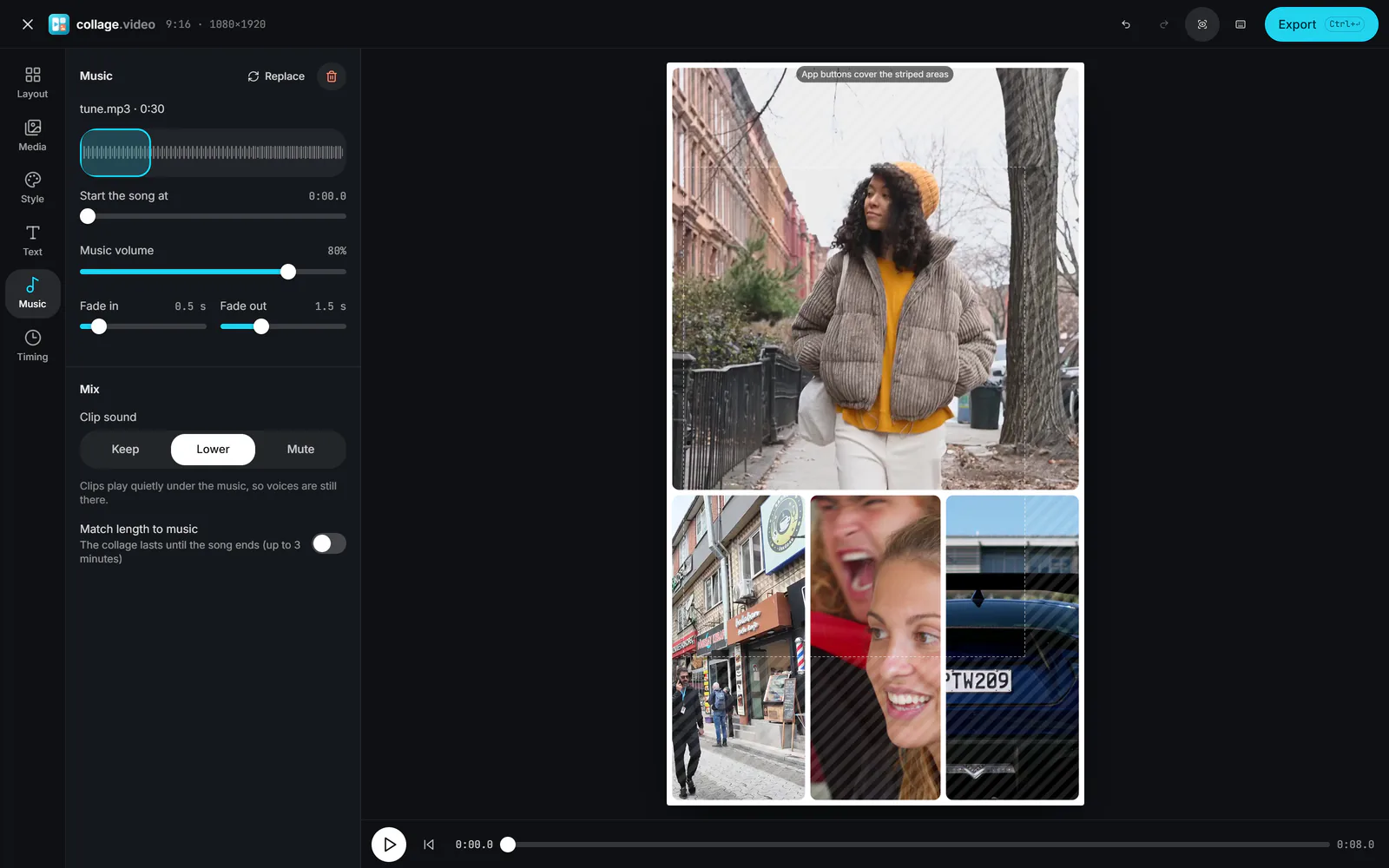
Drag the window over the waveform, or use Start the song at, so the chorus or the drop lands where you want.
 (enlarge image)
Drag the highlighted window, then set the fades and Clip sound.
Set Music volume, Fade in and Fade out. Under Clip sound, choose Keep, Lower or Mute for the videos’ own audio.
Turn on Match length to music if the collage should last as long as the song, then select Export.
Each clip also has its own Volume and mute switch in the Media tab, for when one clip is much louder than the rest.
Three timing choices sit in the Timing tab: Auto follows your longest clip, Set length uses an exact time, and Music (the same as Match length to music) runs until the song ends, up to 3 minutes. With Music on, short clips loop or freeze to fill the time.
For a reveal on the beat, turn on Show one by one and nudge Time between cells until each item lands on a beat.
Your own recordings are always fine. Beyond that, read the licence: "royalty free" usually still means you need a licence, and public-domain recordings are rarer than public-domain compositions. If the collage is for Instagram or TikTok, another option is to export without music and add a track from the app’s own library when you post.
Add your photos, open Music and select Add music, then export as video. Photos stay on screen with a slow zoom while the song plays; set the length in the Timing tab or match it to the music.
Yes. Drag the highlighted window across the waveform, or use Start the song at.
No. There is no built-in library; add a file you have the right to use.
Yes. Choose Lower under Clip sound, which keeps clip audio quietly underneath, or Keep for full level.
Yes. Fade out is set to 1.5 seconds by default and can go up to 5 seconds; Fade in works the same way at the start.
MP3, M4A (AAC), WAV, OGG and FLAC in current browsers. The music is re-encoded as AAC inside the MP4.